

Each state has its own department of motor vehicles (DMV), bureau of motor vehicles (BMV), or motor vehicle division (MVD) to handle car registration and issue licenses to drivers. Because license plates and driver’s licenses are managed at the state level, the types of forms required vary, which can be confusing when you move to a new state. We’ve created this guide to help you find the DMV or BMV forms that you need for your state. We’ll cover some of the most common DMV forms and provide links on where to find them online.
How to Find Your Local DMV or BMV Website
Each state has its own DMV portal, which you can search for “near me,” or go to the state’s DMV and look for local offices. As an example, the California DMV lets you search for locations by ZIP code, with options to search by distance, location type, and services needed.
First, search the name of your state online followed by “DMV” to get to that state’s motor vehicle department website. The acronyms of each state’s DMV vary, so look for DMV, MVD, BMV, or similar motor vehicle abbreviations (taking care to choose the state’s official website).
Second, look for the Forms area in the DMV’s website. This is typically in the main navigation. Most DMVs provide many forms online, and you can search for what you need by the form number or title. For example, “commercial driver license california form” should connect you to the form for a commercial driver license application.
Because tracking down government forms can feel like cracking a code, PDF.Live has created a central website that houses DMV and other government forms in one easy-to-search place.
Free DMV Forms on PDF.Live
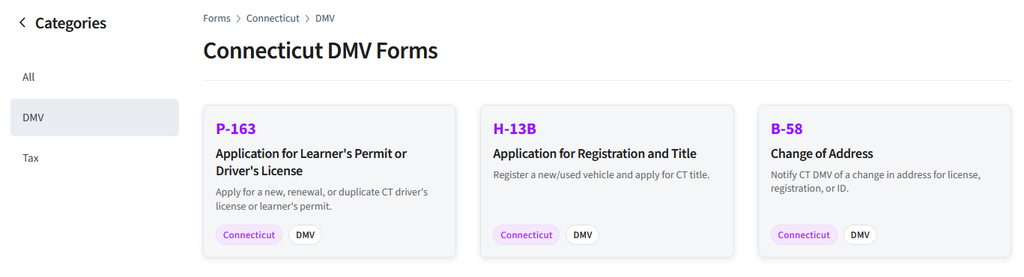
PDF.Live has collected some of the most common DMV forms in our forms library. For example, our Pennsylvania DMV Forms page has forms including:
- Change of address form
- Vehicle registration form
- Disability parking placard application
You’ll find hundreds of forms like these and more, free to download with fillable form fields already created, which makes it easy to complete. We have DMV forms for many of the U.S. states, all searchable online, and we are adding new ones regularly.
Check out the PDF.Live forms page and click your state name under the Jurisdiction tab. Then, select the DMV category.
Common DMV Forms Drivers Need
Here are some of the most common forms that you may need. For sake of clarity, we are using “DMV” to refer to all departments, divisions and bureaus of motor vehicles:
Driver’s license forms
If you’re applying for, renewing, or changing the address of your driver’s license, you will need a separate state-specific form for each action. Some forms you may be able to fill out and submit online, and then continue your application at the DMV. Other forms, like a change of address form, may not require you to go into the DMV. Rules differ from state to state. Examples: California Notice of Change of Address
Vehicle registration forms
The forms for registering a vehicle can be found on most DMV websites. If you’re renewing your registration, states that offer online DMV renewals should mail a renewal form, which can be mailed back, paid online, or taken to your local DMV location. When buying or selling a vehicle, you may need to submit an application for title transfer (if you are working with a dealership, they typically handle this). Example: Arizona title and registration form.
Bill of sale
Bill of sale forms identify a vehicle (with a VIN) that’s being sold, who’s selling it, and who’s buying it. It’s used by the DMV to establish ownership of vehicles and calculate the tax/registration fees. A bill of sale usually has an official template, but any form that contains the sale agreement may be acceptable, depending on your state’s rules. Example: Florida Notice of Sale HSMV82050
Learner’s permit forms
A learner’s permit or driver’s permit is what new drivers apply for so they may drive while learning, typically under supervision of a licensed driver. Each state handles learner’s permits differently, and it almost always requires a trip to the DMV. New drivers typically apply for a driver’s license or learner’s permit, then go to the DMV with their proof of identification and take a written exam. Example: Connecticut’s Application for Learner’s Permit
License plate renewal forms
A license plate form is an application for replacement plates in the case of a stolen or lost plate. If you’re getting a license plate for your vehicle for the first time, you need a vehicle registration form. For license plate tags, the vehicle registration renewal form is needed. Requirements vary by state. Example: Vermont Replacement Registration
Disability placard application
A person with mobility issues can complete an application for a disabled person placard/plate form, which will likely need to be signed by a licensed medical provider. The medical provider gives information about the condition, disability, or disease that the applicant has that would qualify them for a disability placard. Example: Pennsylvania Disability Parking Placard Application
Miscellaneous DMV forms
Some states require miscellaneous forms to be submitted, such as the state of New York’s vision test report (it’s specific to drivers with vision limitations. Many states also offer some form of “transfer on death,” which allows a vehicle owner to designate an heir for a motor vehicle. Examples: New York vision test report and Texas affidavit of heirship for a motor vehicle
FAQs About DMV Forms
Do I need to print and mail my DMV form, or can I submit it online?
Yes, some DMV forms can be submitted online, but many DMVs require you to print and mail forms or present them in person, especially if providing any additional documents like identification and proof of insurance. Vehicle registration or driver’s license renewals can be submitted online, for example, depending on your state. The DMV may request additional information. Check their websites for rules pertaining to submitting forms.
Can I use the same DMV form in multiple states?
No, the same DMV form cannot be used in multiple states. Each state has its own form that you will need to find.
How do I save a form after I’ve filled it out in PDF.Live?
When you fill out a form using PDF.Live, you can download the completed form and save it to your device. If you are a paid subscriber to PDF.Live, a copy is automatically saved to your Studio dashboard. To save a form that’s being filled out without losing progress, click the Download or Save buttons at the top of the PDF.Live editor.
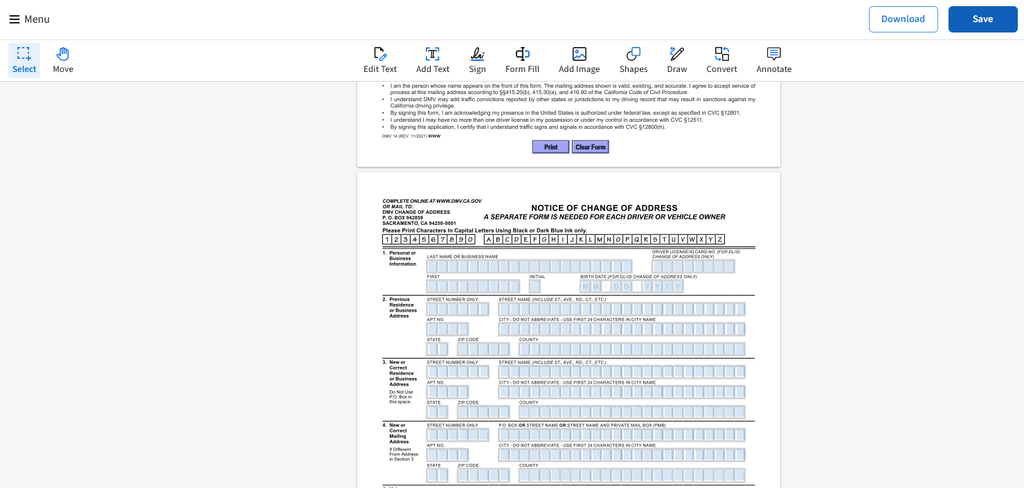
These forms can be filled out online and downloaded for free, but if you want to save your document online, you will need to make an account with PDF.Live.
Alternatively, if you’re filling a form out in your web browser that’s been set up with fillable form fields, click the Print or Save icons at the top of the toolbar once you’ve filled out the form.

Can I fill out PDF.Live’s DMV forms on my computer, or do I have to print them?
Yes, you can fill out all of PDF.Live’s DMV forms online. You do not have to print DMV forms unless required to mail them or bring them into a DMV office. PDF.Live allows you to save DMV forms on your computer if you can submit the form online. No printer needed, unless required.
Do I need to notarize my DMV form?
Most of the common DMV forms do not need to be notarized. There are a few edge cases where vehicle titles are being transferred or replaced, or a vehicle title holder is released, where a notary is needed. But any form that needs to be notarized will be indicated as such.