

There may be cases where you’ll need to use PDFs as you submit your taxes. Whether it’s a 1040, W-4, W-9, or something else, odds are you’ll be working with PDF file formats.
At the IRS.gov forms page, you’ll see that most tax forms are readily available as PDFs. The IRS uses PDFs because the format is preserved across almost every type of device. No matter what device you open a PDF with, it should look the same. The PDF that you see will be formatted the same way for everyone who views it.
In this guide, we’ll cover:
- Where to find free fillable tax forms (PDFs) online
- How to convert a tax file into a fillable PDF form
- How to convert your completed tax forms into PDFs
We’ll also provide links to PDF tax forms, IRS forms, and show you how to turn a PDF into a fillable form.
Where Do You Find Free Tax Forms?
Federal tax forms can be found online through the IRS.gov tax form section, where you’ll find PDF versions of all of the types of tax forms you may need. This includes personal income tax forms, business tax forms and over 3,000 forms, instructions and publications. All of the forms are available to download for free as fillable forms.
If you’re looking for forms for individual states, we’ve listed some of the most common state forms below with links provided. These free fax forms will usually be available for download as a PDF, but the layout and structure of each site will change from state to state.
How Can You Convert a Blank Tax Form into a Fillable PDF Online?
If a tax PDF that you download isn’t a fillable form, you can convert it with PDF.Live. A fillable form is a document that has designated sections that can be typed in by the user. These fillable fields look like boxes where you can enter text.
1. Download the tax form that you need and open it in the PDF.Live editor.
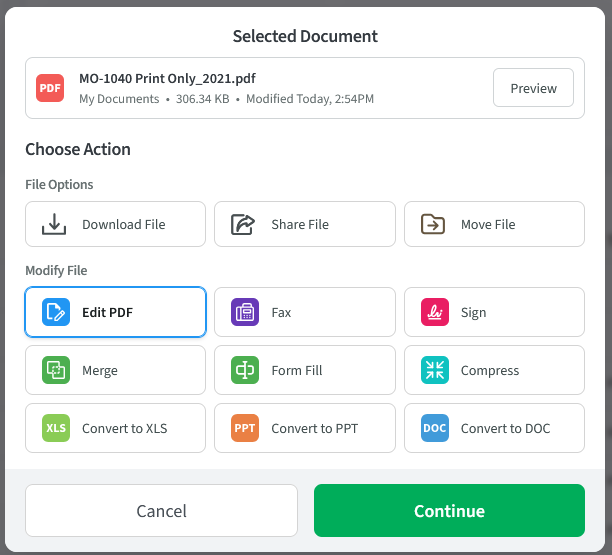
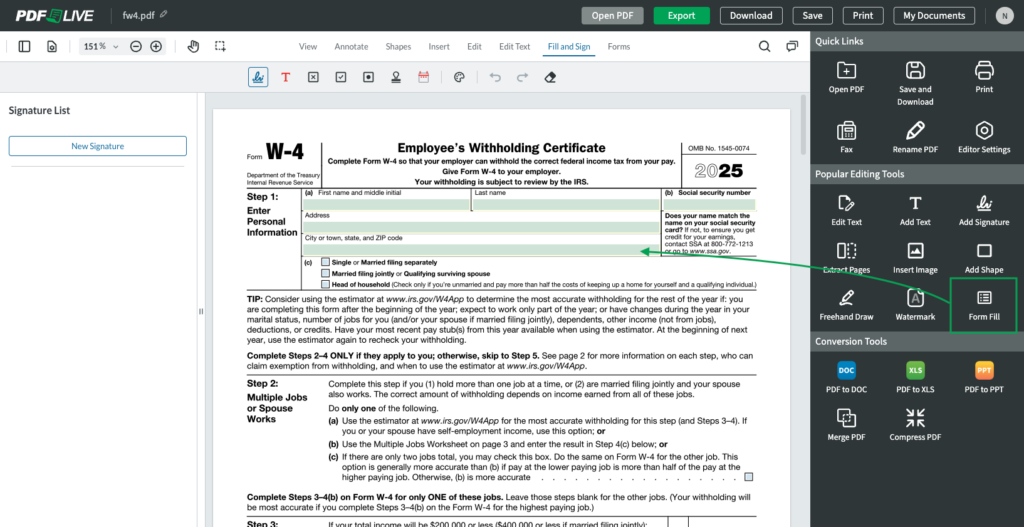
2. Under the Popular Editing Tools of the PDF.Live editor, click the Form Fill icon. PDF.Live auto detects forms, so you can fill them in within the editor.
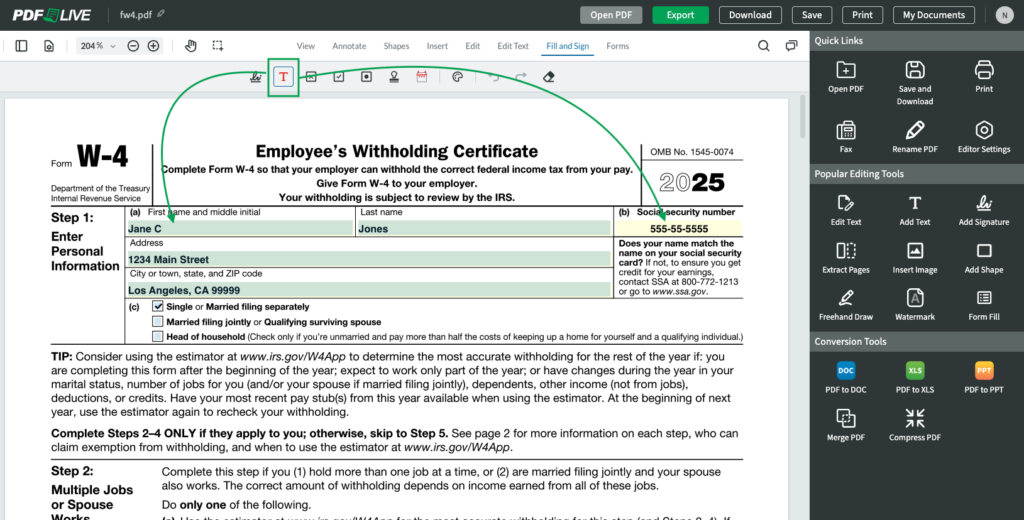
3. Select the Text tool from the menu. Position your cursor over the box and enter your text, the active box will change color. You’ll also notice that PDF.Live’s editor even detects checkboxes for you.
4. Once you’re done adding all of your fillable fields, click the Download button at the top of the PDF.Live editor. You’ll download a new version of your PDF that now has fillable form fields on it. Make sure that this version is the one that you use.
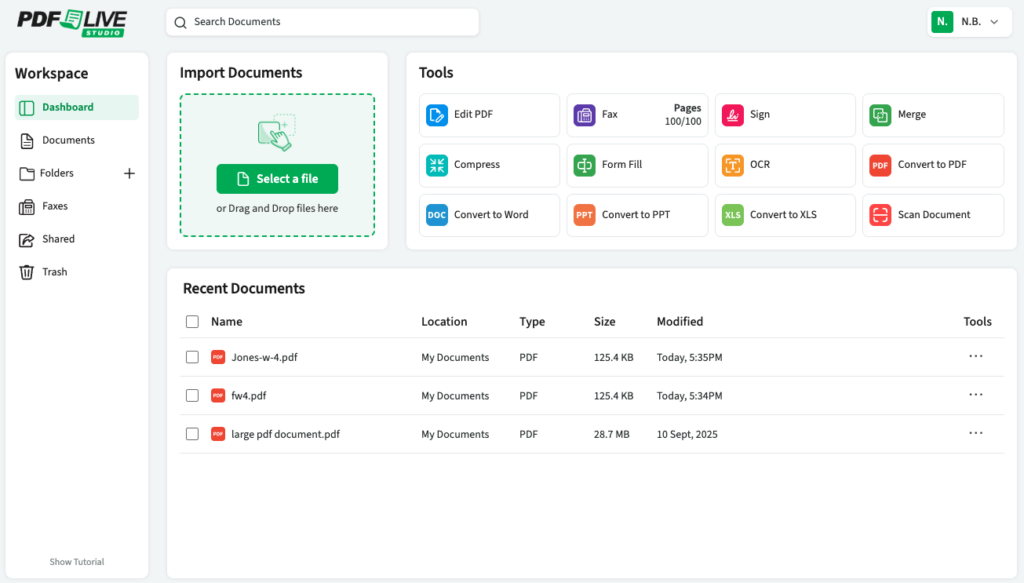
5. To save the file to your PDF.Live Studio dashboard, select Save and Save as, and name your file.
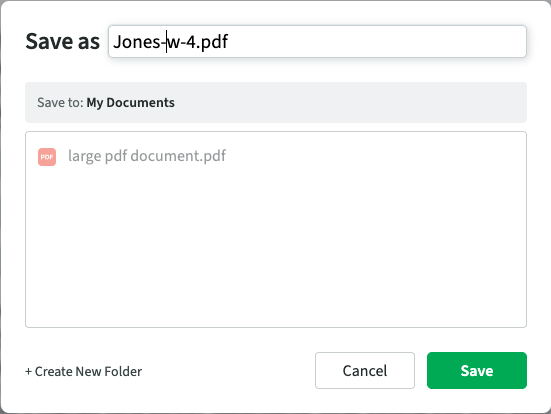
6. Navigate to My Documents, and this is where you’ll see all of your saved PDF files.
How Do You Save Your Tax Forms as PDFs?
In this section, we answer questions about how to save tax forms as PDFs outside PDF.Live, such as from a paper copy or from an online tax service.
Converting hard copies of tax forms to PDF
If you have a paper copy of a tax form, you’ll need to scan it to save it as a PDF. There are a few ways to do this:
- Scan your document using a document scanner.
- Go to an office supply store or library to use a scanner (often a combination printer-scanner-fax machine).
- Use a scanner app on your smartphone device to take a high-quality image of your document.
When scanning a document, you’ll be prompted to save the digital version, usually as a PDF. For scanning at an office supply store or library, you may need to bring a flash drive to save the digital version of the document on. Otherwise, you might need a computer connected to the scanner to access the PDF — it’s always smart to call ahead to find out how it works.
Downloading or saving tax forms from software or apps
If you use software (TurboTax, H&R Block, TaxAct, etc.) to fill out your taxes, you should receive a copy of all the forms that you’ve filled out once you’ve completed your taxes. The copies of these forms are usually in the PDF format, but if they aren’t, PDF.Live offers DOC to PDF, Excel to PDF, and JPG to PDF online conversion services.
Alternatively, once you’re done filling out the forms through the software or secure online application, you can download and save as PDF.
PDF Tax Tools
Once you’ve submitted all your tax returns, you’ll want to save these forms for your records. How long should you keep tax records? Your tax preparer can answer that. You can also find answers on the IRS’s tax help website.
PDF.Live has a couple of tools that can help you out with file management:
- Merge PDF — Merge all of your tax forms and attachments into a single document titled “2025 Taxes” for easier organization and storage.
- Convert PDF — Have some tax forms or attachments/schedules in a format that aren’t PDFs? Convert your DOC, Excel, PPT, and JPG files to PDFs so you’ll be able to read them anywhere at any time. File formats that are of the same type will be possible to merge.
- Compress PDF — Tight on computer storage space? Use PDF.Live’s PDF compression service to store PDFs easier on your computer. This compressor will not alter or damage the layout of your PDF — it will reduce the file size.
- Fax PDF — Need to send your tax documents to the IRS or to someone else, such as your accountant? Fax.Live functions entirely in your web browser. No fax machine needed!
- Studio — As long as your PDF.Live account is active and current, you can safely store all of your PDF files, including your tax files.
PDF.Live’s tools don’t require any additional downloads to function. Because PDF.Live is web-based, you can use our tools from any device that has an internet connection. Consider trying out our services today, entirely for free! PDF.Live offers limited daily tasks with no additional cost to you. If you like PDF.Live, consider our low-cost monthly subscription that allows for unlimited usage of our many PDF management tools.
IRS and State Tax Forms
Other IRS forms for businesses and individuals
California tax forms for individuals and businesses
Colorado tax forms for individuals and families
Colorado tax forms for other entities
Connecticut individual income tax forms
Connecticut business tax forms
Delaware personal income tax forms
D.C. individual income tax forms
Florida tax forms for businesses and individuals*
Georgia tax forms for individuals and businesses
Kansas tax forms and publications
Louisiana tax forms for individuals and businesses
Minnesota department of revenue forms
Mississippi individual tax forms
Montana tax and state revenue forms
Nebraska revenue forms for individuals and other entities
New Mexico forms and publications
New York forms and instructions
Pennsylvania personal income tax forms
Pennsylvania business tax resources
South Carolina individual tax forms
South Carolina business tax forms
Tennessee department of revenue forms*
Vermont tax forms and publications
Washington state forms and publications*
West Virginia tax forms for businesses and individuals
Wyoming’s department of revenue*
*These states generally do not levy personal income taxes as of this publication date. This is not legal or financial advice. Always check with a tax professional.